There’s one small thing about working with macros in DaVinci Resolve that has always annoyed me. You download a macro from a stock site or a template. It works (or sometimes it doesn’t, but that’s not the point). At some point you want to go inside, tweak something, change the structure. And most of the time you simply can’t, because it’s a Macro.
To access the internal composition, the Macro has to be converted into a Group. On paper it’s a tiny change , just a single line of text. In practice, though, it means copying the structure, pasting it into Notepad, manually replacing that line, and pasting everything back into the Flow.
There’s no simple built-in button for this in Resolve. Which raises the question: why isn’t something this basic handled natively?
Macro vs Group
In Fusion, the difference between a Macro and a Group is not about what’s inside, but how the system treats it.
A GroupOperator is simply a regular group of nodes. You can enter it, see the entire structure, add nodes, remove them, and change the connections. It’s a working structure, flexible, open, and fully editable.
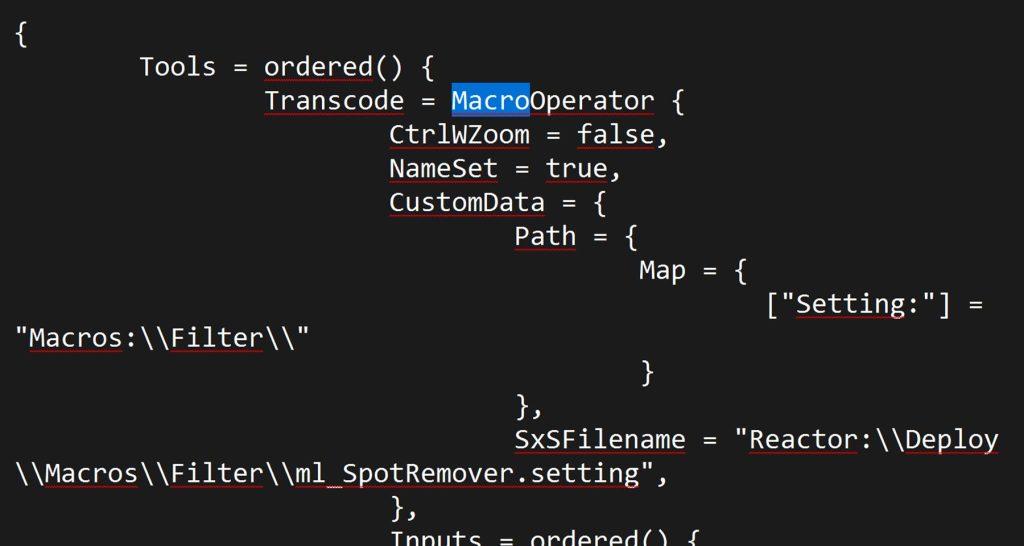
A MacroOperator contains the exact same node structure, but it is “wrapped.” It exposes selected parameters to the outside while the rest of the internal structure is treated as closed. A macro is meant to behave like a finished tool , the end user adjusts sliders rather than rebuilding what’s inside.
Technically, both contain the same internal structure. The difference is that a Macro is interpreted as a final product, while a Group is treated as a structure meant for further work.
That’s why changing a single declaration (MacroOperator/ GroupOperator) is enough to turn a “closed tool” into an open structure that you can enter and modify.
Why does this “one-line change” work at all? It’s worth clarifying one thing: what you copy from Fusion into Notepad is not code in the traditional programming sense. It’s a text representation of the node structure in Fusion.
Fusion stores nodes as a textual description, something like a declaration that defines:
- what type of tool it is
- what parameters it has
- how the nodes are connected
- what the parameter values are
When you copy a node (Ctrl+C) and paste it into Notepad, this is exactly the representation you see.
Converting in Notepad
This is the multi-step approach. A bit like plowing the field from scratch every time. You copy the Macro node, paste its structure into Notepad, change a single line of text, copy everything again, and paste it back into Fusion. The result is a full node structure.
The process looks like this:
- Ctrl+C on the Macro node
- Paste into a text editor
- Replace MacroOperator with GroupOperator
- Copy the entire block again
- Paste it back into Fusion
Conversion in the System Clipboard
The whole Notepad step can actually be removed. For example, a simple .bat file can operate directly on the Windows system clipboard and replace MacroOperator with GroupOperator before the content is pasted back into Fusion.
@powershell -NoProfile -Command ^
"$t=Get-Clipboard;if($t){$t=$t -replace 'MacroOperator','GroupOperator';Set-Clipboard $t;Set-Clipboard $t}"- Copy the node (Ctrl+C)
- Run the .bat file
- Paste (Ctrl+V)
One-click multitask
The whole process can be streamlined and mapped to a single action (for example on Loupedeck CT, Elgato Stream Deck, or Microsoft PowerToys). The Macro then returns as a Group with a single click. It’s worth adding a short delay between commands to make sure each step executes properly.
Typical sequence:
- Copy node (Ctrl+C)
- Deselect node (Ctrl+Shift+A)
- Run the .bat file
- Paste (Ctrl+V)
Reactor – conversion directly inside Fusion
Gamechanger option is Reactor. Reactor is a repository of tools created by the community around the We Suck Less forum. After installation, you can browse and install scripts that simply don’t exist in the standard version of DaVinci Resolve.
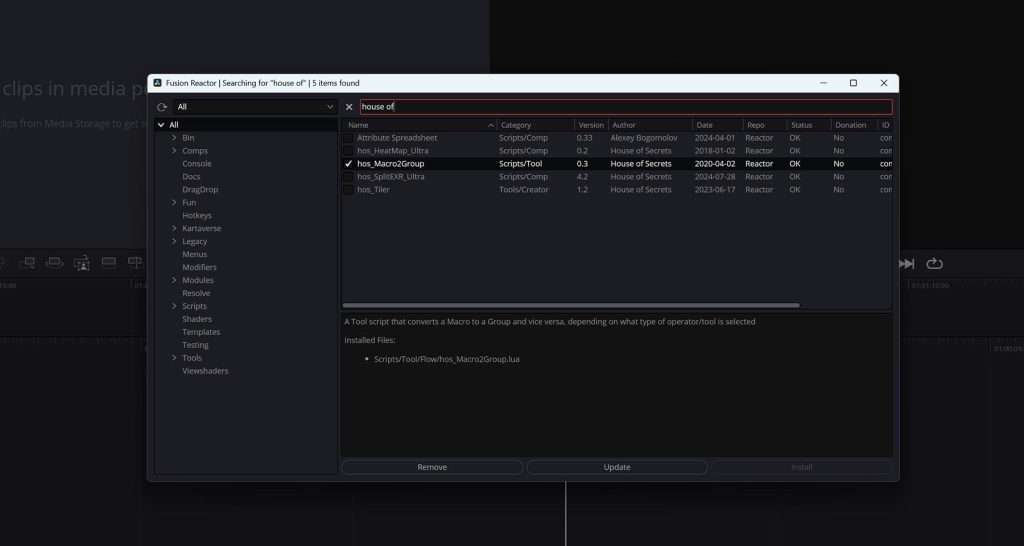
Many small workflow problems that appear in day-to-day work have already been noticed and solved by someone in the community. One such solution is a script from House of Secrets, which directly converts MacroOperator into GroupOperator inside the Fusion flow.
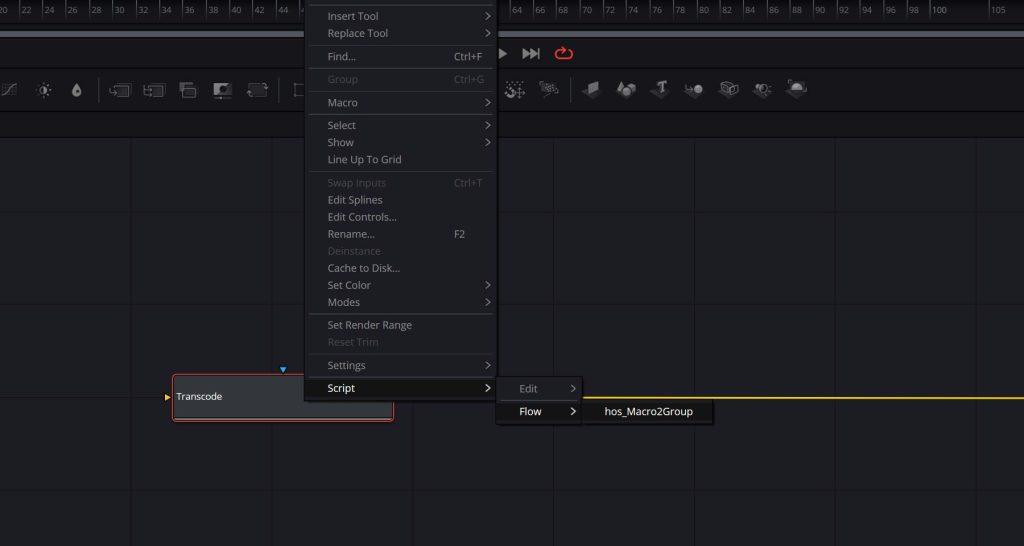
If you work in Fusion regularly , or often take apart macros from templates, installing Reactor quickly becomes essential.
Where to download Reactor:
https://www.steakunderwater.com/wesuckless